
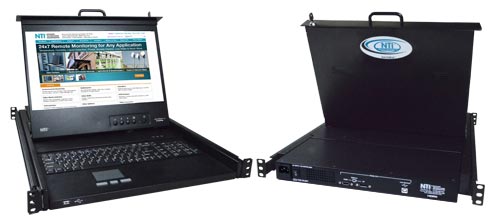
In modern USA corporate IT environments, efficiency, uptime, and optimal use of space are non-negotiable. IT administrators know one hard truth very well: rack space is gold. Every inch inside a server rack matters, especially as data centers, server rooms, and network closets continue to grow denser. This is exactly why the rackmount monitor keyboard has become an essential component in professional IT setups across the United States.
A rackmount monitor keyboard combines a keyboard, video display, and mouse into a single compact unit that mounts directly into a standard server rack. Typically available in 1U or 2U designs, these units slide in and out smoothly, offering instant access when needed and staying neatly tucked away when not in use.
Why Rackmount Monitor Keyboards Are Essential in Server Rooms
Traditional server management often meant using separate monitors, keyboards, and mice for multiple servers. In a modern environment with dozens—or even hundreds—of rack-mounted servers, this approach is simply impractical.
Rack mounted monitors solve this problem by centralizing control into a single console drawer. With one unit, administrators can access multiple systems efficiently without cluttering the workspace or sacrificing valuable rack space.
For USA-based corporate IT teams managing mission-critical systems, this streamlined approach improves workflow, reduces downtime, and supports faster troubleshooting.
Space Optimization and Operational Efficiency
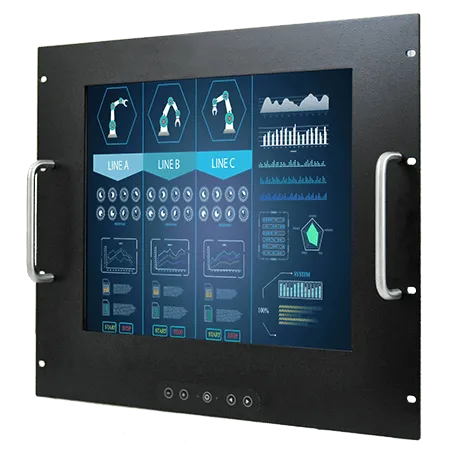
One of the biggest advantages of a rack mount keyboard monitor is space optimization. These all-in-one console drawers eliminate the need for bulky external peripherals. When closed, the unit occupies only 1U or 2U of rack space, leaving room for additional servers or networking equipment.
This compact design is particularly valuable in:
- Corporate data centers
- Financial institutions
- Healthcare IT environments
- Government and defense facilities
- Enterprise server rooms
By minimizing physical clutter, IT teams can maintain cleaner, more organized rack layouts—an important factor for airflow management and hardware longevity.
Energy Efficiency and Cost Savings
Energy consumption is a major concern for USA corporate IT departments, especially those operating large-scale data centers. Running multiple standalone monitors and peripherals increases power usage and operational costs.
A rackmount monitor keyboard reduces energy consumption by consolidating devices into a single unit. Instead of powering multiple displays and keyboards, administrators rely on one integrated console. Over time, this results in substantial energy savings, making these solutions ideal for budget-conscious IT operations focused on sustainability and cost control.
Connectivity and Compatibility Options
Modern rackmount solutions are designed to be flexible and compatible with diverse IT infrastructures. Today’s rack mounted monitors support a wide range of video and interface options, including:
- DisplayPort
- HDMI
- DVI
- VGA
Keyboard and mouse connectivity options typically include USB and PS/2, ensuring compatibility with both modern and legacy servers.
Some advanced models feature built-in KVM switches, allowing administrators to control multiple servers from a single rackmount monitor keyboard. This dramatically simplifies server management and reduces the need for additional hardware.
Advanced Features for Modern IT Needs
USA corporate IT environments demand more than basic functionality. That’s why many rack mount keyboard monitor solutions now include advanced features such as:
- High-brightness LCD displays for improved visibility
- Short-depth drawers for tight or shallow racks
- IP-enabled access for remote server management
- CAT5 interfaces to reduce cable clutter and improve airflow
These features make rackmount monitor keyboards suitable not only for traditional data centers but also for edge computing locations, remote offices, and distributed IT environments.
Enhancing Security and Control
Security is a top priority in corporate IT environments. Rack mounted monitors help improve security by limiting physical access points. Instead of leaving external peripherals exposed, the console drawer stays locked inside the rack when not in use.
For regulated industries in the USA—such as finance, healthcare, and government—this added layer of control supports compliance requirements and reduces the risk of unauthorized access.
Choosing the Right Rackmount Solution
Selecting the right rackmount monitor keyboard depends on several factors:
- Rack depth and available space
- Number of servers to be managed
- Required video resolution
- Need for remote or IP-based access
- Compatibility with existing hardware
A well-matched solution improves operational efficiency and ensures long-term reliability in demanding IT environments.
Call to Action
If your IT team is looking to optimize rack space, reduce energy costs, and simplify server management, a rackmount monitor keyboard is a smart investment. Whether you need a basic console drawer or an advanced IP-enabled solution, the right configuration can transform how your server room operates.
Talk to an expert today and design a rackmount solution tailored to your USA corporate IT environment.
Frequently Asked Questions (FAQs)
1. What is a rackmount monitor keyboard?
A rackmount monitor keyboard is an integrated console that combines a display, keyboard, and mouse into a single unit designed to mount inside a server rack.
2. What rack sizes are supported?
Most rack mount keyboard monitor units are available in 1U or 2U designs and fit standard 19-inch server racks used across the USA.
3. Can one unit control multiple servers?
Yes. Many models include built-in KVM switches or support external KVM integration, allowing control of multiple servers from one console.
4. Are rack mounted monitors energy efficient?
Absolutely. By consolidating peripherals into one device, they significantly reduce power consumption compared to multiple standalone monitors and keyboards.
5. Do these units support remote access?
Advanced rackmount monitor keyboard models offer IP-enabled functionality, allowing remote server access from secure locations.